

- Products
-

 Networking
- > AI Smart Managed Series
- > Industrial Ethernet
- Industrial PoE Media Converter
- Industrial Media Converter
- Industrial Unmanaged PoE Switch
- Industrial Managed PoE Switch
- Industrial Unmanaged Ethernet Switch
- Industrial Managed Ethernet Switch
- Industrial Serial Fiber Converter
- Industrial PoE Injector
- Industrial PoE Splitter
- Industrial PoE Extender
- Industrial Optical Switch
- Industrial PD Switch
- DIN-Rail Power Supply
- Rackmount DIN-Rail Bracket
- LED Screen Fiber Converter
- Industrial Ethernet Switch & 5G Router
- Industrial EOC Converter
- > Commercial Ethernet
-
 Video Transmission
-
 SFP Transceiver
-
 Other Fiber Optic & Networking Products
-
- Solutions
- News
- About
- Contact



 NetworkingVideo TransmissionSFP TransceiverOther Fiber Optic & Networking Products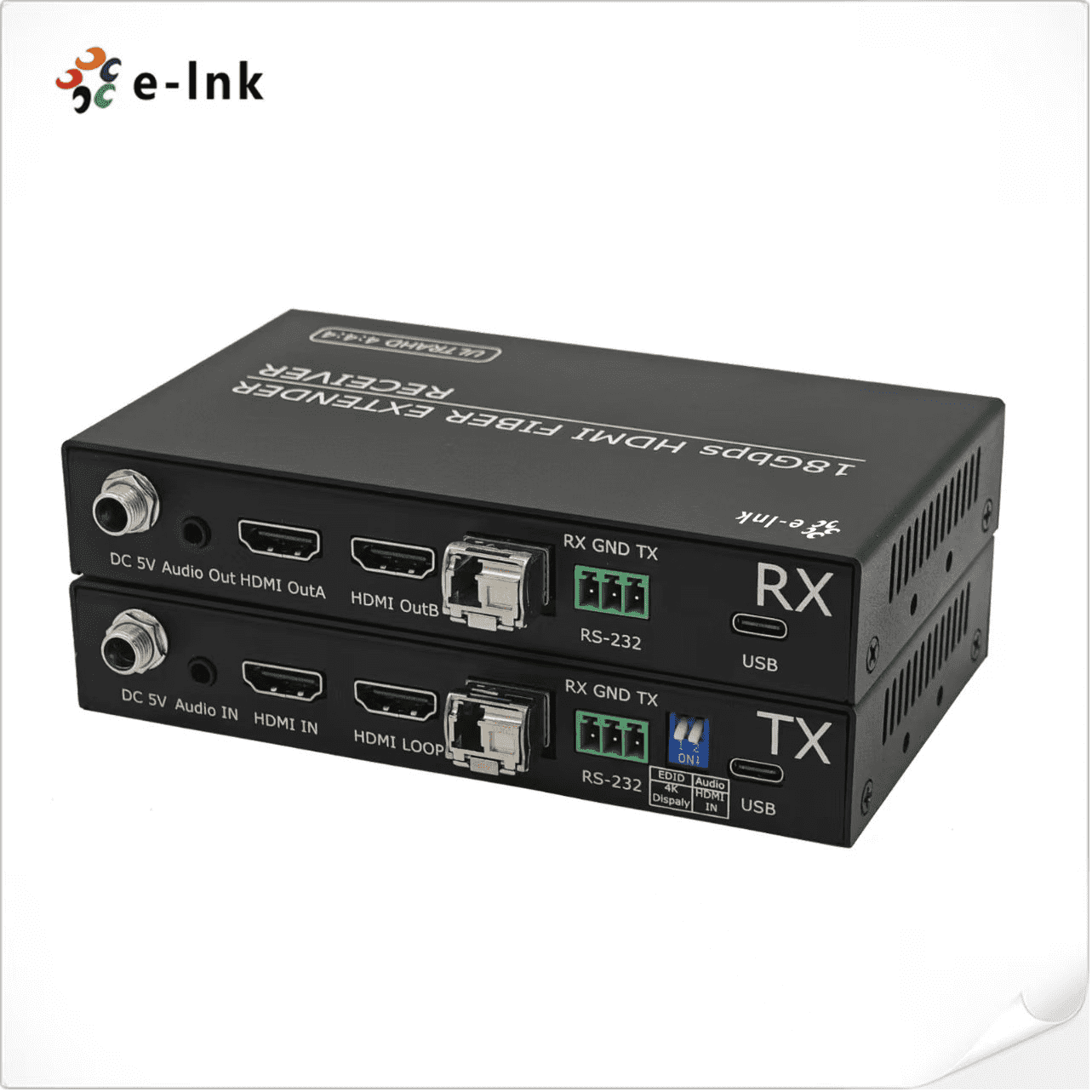
4K HDMI 2.0 4:4:4 Fiber Optic Extender
Model:LNK-4KH-QC-1A1R
► Supports synchronous audio and video extension output.
► Supports video bandwidth up to 18Gbps.
► Supports bidirectional IR control, RS-232 pass-through, and EDID management for simple and convenient control.





4K HDMI 2.0 4:4:4 Fiber Optic Extender, support bidirectional IR control, RS-232 pass-through, and EDID management for simple and convenient control.
► Supports synchronous audio and video extension output.
► Supports video bandwidth up to 18Gbps.
► Supports bidirectional IR control, RS-232 pass-through, and EDID management for simple and convenient control.
► Supports video resolutions up to 4K2K@50/60Hz with 4:4:4 chroma sampling.
► Complies with HDMI 2.0b, HDCP 2.2, and DVI 1.0 standards.
► Transmitter features a loop-out interface (for sharing local signals) and external audio embedding capability.
► Transmission distance of up to 20 kilometers (using single-mode fiber).
|
Transmitter Interfaces Standards |
1 x HDMI 2.0 Input (4K@60Hz) 1 x HDMI 2.0 Loop-out (4K@60Hz) 1 x Audio Input 1 x SFP 1 x RS232 2 x 1R |
|
Transmitter Interfaces Standards |
2 x HDMI 2.0 Output (4K@60Hz) 1 x Audio Output 1 x SFP 1 x RS232 2 x1R |
|
Video Resolution HDMI |
SMPTE:720p|1080p12160p VESA:800x600|1024x768|1280x720|1280x800|1280x960|1280x1024|1400x1050|1600x1200|1920x10801920x1200|2048x1152|2560x1600|3840x1080|3840x2160|4096x2160 |
|
Video Resolution Refresh Rate |
23.98/24/25/29.97/30/50/59.94/60Hz |
|
Supported Standards HDMI |
1.3、1.4、2.0 |
|
Supported Standards DVI |
1.0 |
|
Input Voltage |
DC 5V |
|
Maximum Power Consumption |
10W |
|
Operating Temperature |
-25℃~55℃ |
|
Humidity |
20%-90% |
|
Device Weight |
1.0kg |
|
Shipping Weight |
1.5kg |
|
Device Dimensions |
140mmx85mmx25mm |
|
Shipping Dimensions |
310mmx220mmx55mm |
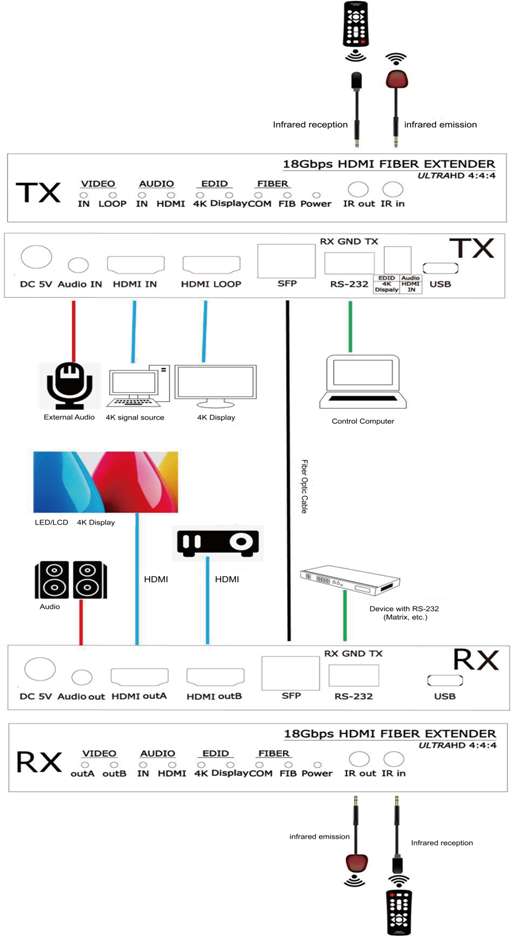
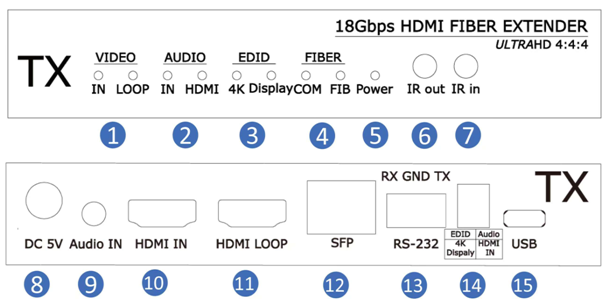
Transmitter
|
1.Video Signal Indicators |
IN: HDMI Signal Input
Indicator: The indicator remains steadily lit when a signal is input through
the HDMI IN port. |
|
2.Audio Indicators |
When the Audio DIP
switch is set to IN, the indicator remains steadily lit, indicating
that the audio source is from external audio input. |
|
3.EDID Indicators |
When the DIP
switch is set upward to 4K, the device uses its internal EDID. |
|
4.Fiber Optic Indicators |
Fiber Connection Indicator (FIB): The FIB indicator remains steadily lit when a normal fiber signal connection is established between the transmitter and receiver. Communication Indicator (COM): The COM indicator remains steadily lit when a normal fiber signal connection is established between the transmitter and receiver. It blinks during EDID learning. |
|
5.Power Indicators |
The power indicator remains steadily lit when the device is powered |
|
6.IR OUT |
Connect the IR transmitter cable,this IR signal comes from the receiver's IR IN port, allowing control of the source device at the transmitter side using a remote at the receiver side. |
|
7.IR IN |
Connect the IR receiver cable; this IR signal is sent to the receiver's IR OUT port, allowing control of the display device at the receiver side using a remote at the transmitter side. |
|
8.DC 5V |
DC 5V/2A Power Interface |
|
9.Audio |
Audio Input Port,Connects to audio source devices, such as MP3 players, etc. |
|
10.HDMIIN |
HDMI Input Port, Connects to HDMI source devices, such as PCs, Blu-ray DVD players, etc. |
|
11.HDMI LOOP |
HDMI Loop-out Port: Connects to HDMI display devices to share local high-definition audio and video signals, such as HDTV, projectors, etc. |
|
12.Fiber Optic Interface |
Single-mode Single-core LC: Connects to the transmitter's fiber module, transmitting signals to the receiver via fiber optic cable. |
|
13.DIP Switches |
EDID DIP Switch: Manages switching between learning EDID and using the internal EDID. Audio DIP Switch: Manages switching between HDMI embedded audio and external audio input. |
|
14.RS232 |
RS-232 Pass-through Interface, Transmits RS-232 command signals between the transmitter and receiver. |
|
15.USB |
Used for connecting to a host computer and for device upgrades. |
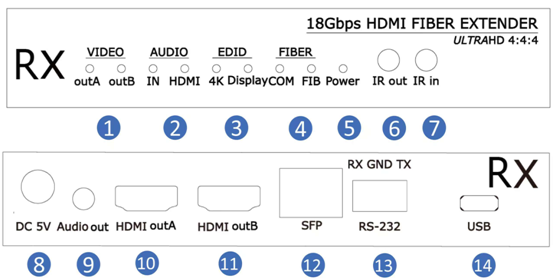
Receiver
|
1.Video Signal Indicators |
OUTA: The indicator remains steadily lit when HDMI is connected to a monitor or other display device. OUTB: The indicator remains steadily lit when HDMI is connected to a monitor or other display device. |
|
2.Audio Indicators |
When the Audio DIP switch is set to IN, the indicator remains steadily lit, indicating that the audio source is from external audio input. When the Audio DIP switch is set to HDMI, the indicator remains steadily lit, indicating that the audio source is from HDMI embedded audio input. |
|
3.EDID Indicators |
When the DIP
switch is set upward to 4K, the device uses its internal EDID. |
|
4.Fiber Optic Indicators |
The FIB indicator remains steadily lit when a normal fiber signal connection is established between the transmitter and receiver |
|
5.Power Indicators |
The power indicator remains steadily lit when the device is powered on. |
|
6.IR OUT |
Connect the IR transmitter cable; this IR signal comes from the receiver's IR IN port, allowing control of the source device at the transmitter side using a remote at the receiver side. |
|
7.IR IN |
Connect the IR receiver cable; this IR signal is sent to the receiver's IR OUT port, allowing control of the display device at the receiver side using a remote at the transmitter side. |
|
8.DC 5V |
DC 5V/2A Power Interface |
|
9.Audio |
Audio signal output port, used to connect to audio devices such as speakers or mixers. |
|
10.HDMI OUTA |
HDMI signal output port A (backup output), used to connect to HDMI display devices such as monitors, projectors, 4K transmission cards, etc. |
|
11.HDMI OUTB |
HDMI signal output port B (main output), used to connect to HDMI display devices such as monitors, projectors, 4K transmission cards, etc. |
|
12.Fiber Optic Interface |
Single-mode Single-core LC: Connects to the transmitter's fiber module, transmitting signals to the receiver via fiber optic cable. |
|
13.RS232 |
RS-232 Pass-through Interface: Transmits RS-232 command signals between the transmitter and receiver. |
|
14.USB |
Used for connecting to a host computer and for device upgrades. |
- Download FileName:E-link LNK-4KH-QC-1A1R 4K@60Hz HDMI Audio-Video Fiber Optic Extender Datasheet V2.0.pdf Size: 1.77MB
| Model | Description |
| LNK-4KH-QC-1A1R | 4K HDMI 2.0 4:4:4 Fiber Optic Extender with loop output, 4K@60Hz,LC, SMF, 1310/1270, 20km, 1CH RS232, 1CH forward audio, including 1 transmitter & 1 receiver, used by pairs |
Recommended Products