

- Products
-

 Networking
- > AI Smart Managed Series
- > Industrial Ethernet
- Industrial PoE Media Converter
- Industrial Media Converter
- Industrial Unmanaged PoE Switch
- Industrial Managed PoE Switch
- Industrial Unmanaged Ethernet Switch
- Industrial Managed Ethernet Switch
- Industrial Serial Fiber Converter
- Industrial PoE Injector
- Industrial PoE Splitter
- Industrial PoE Extender
- Industrial Optical Switch
- Industrial PD Switch
- DIN-Rail Power Supply
- Rackmount DIN-Rail Bracket
- LED Screen Fiber Converter
- Industrial Ethernet Switch & 5G Router
- Industrial EOC Converter
- > Commercial Ethernet
-
 Video Transmission
-
 SFP Transceiver
-
 Other Fiber Optic & Networking Products
-
- Solutions
- News
- About
- Contact


 NetworkingVideo TransmissionSFP TransceiverOther Fiber Optic & Networking Products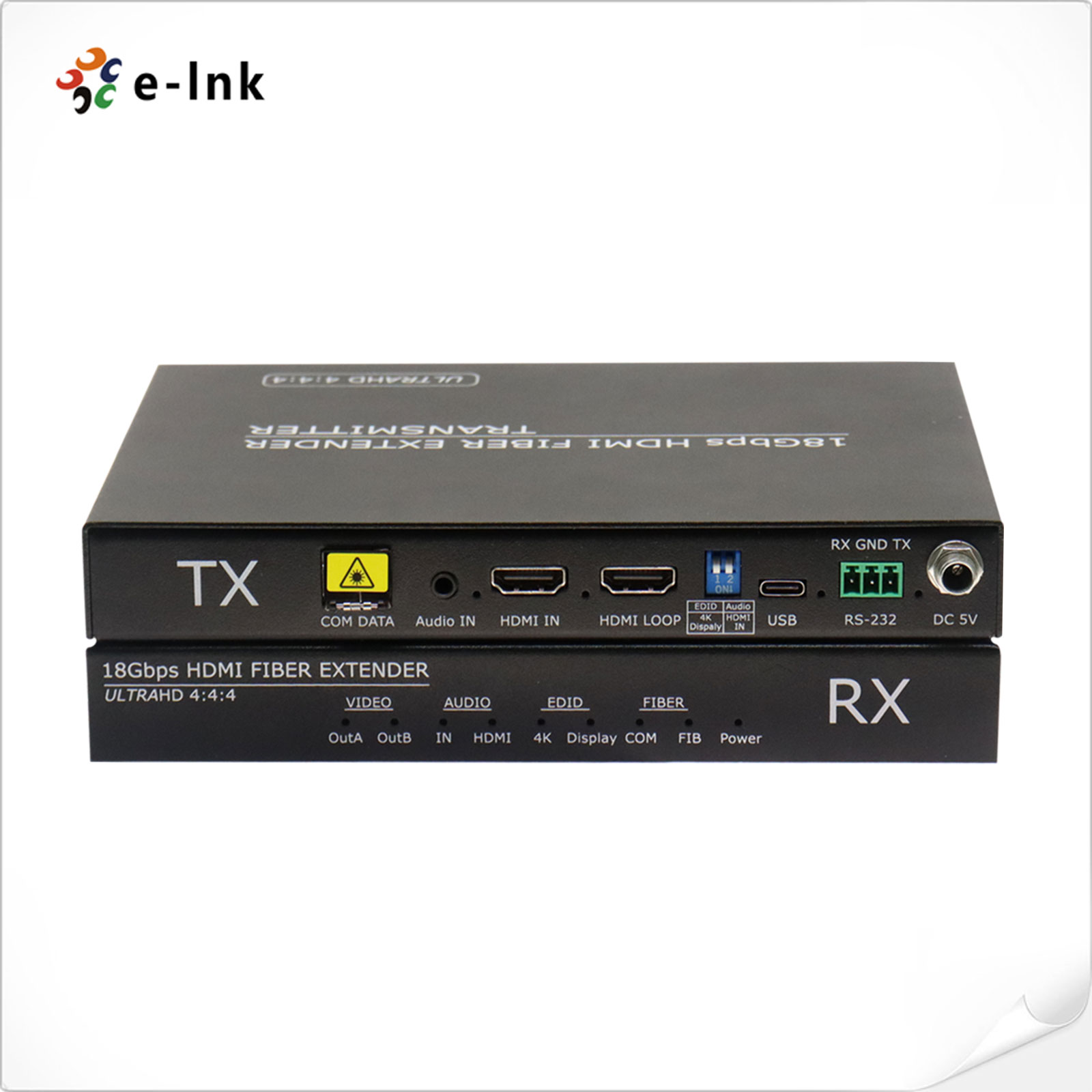
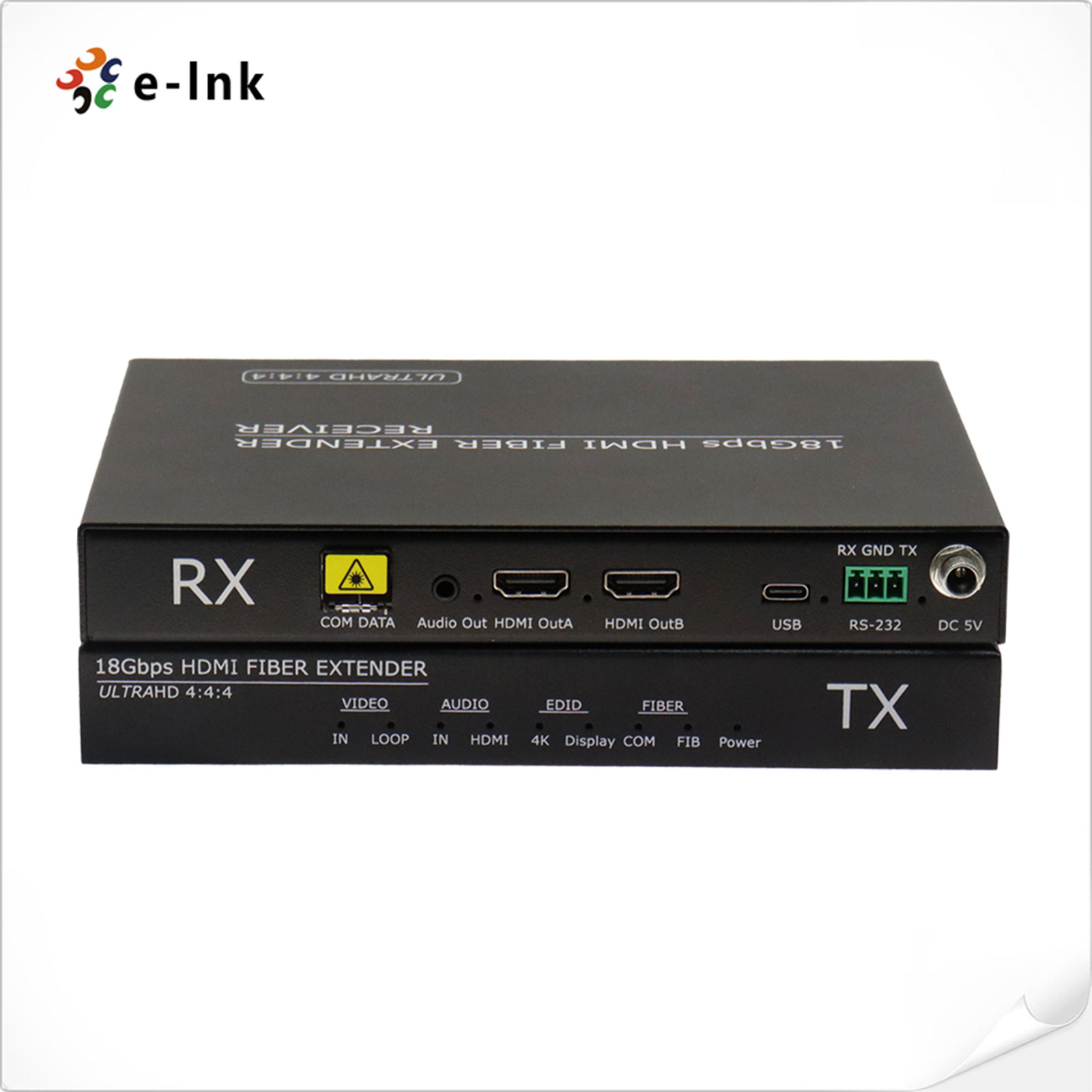
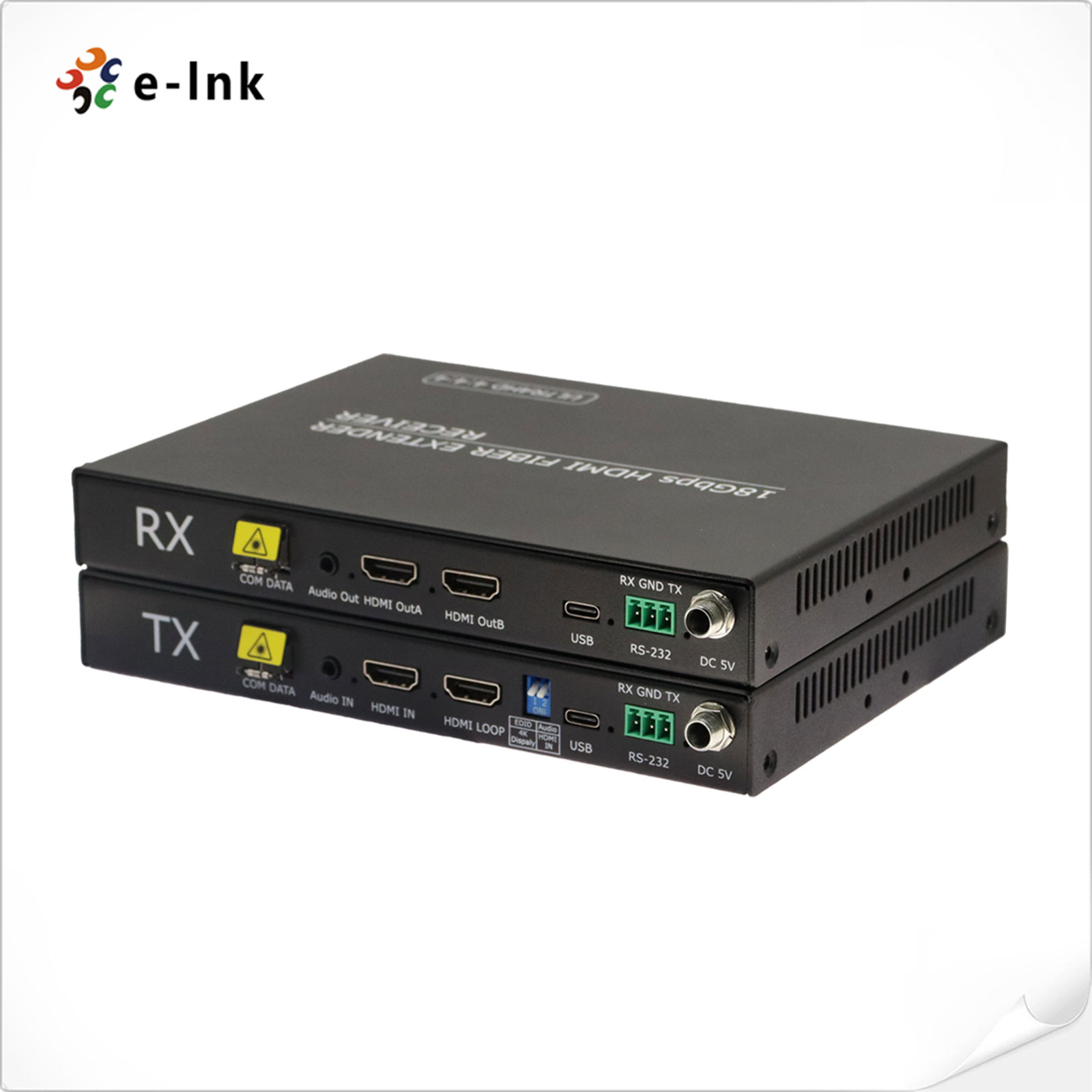
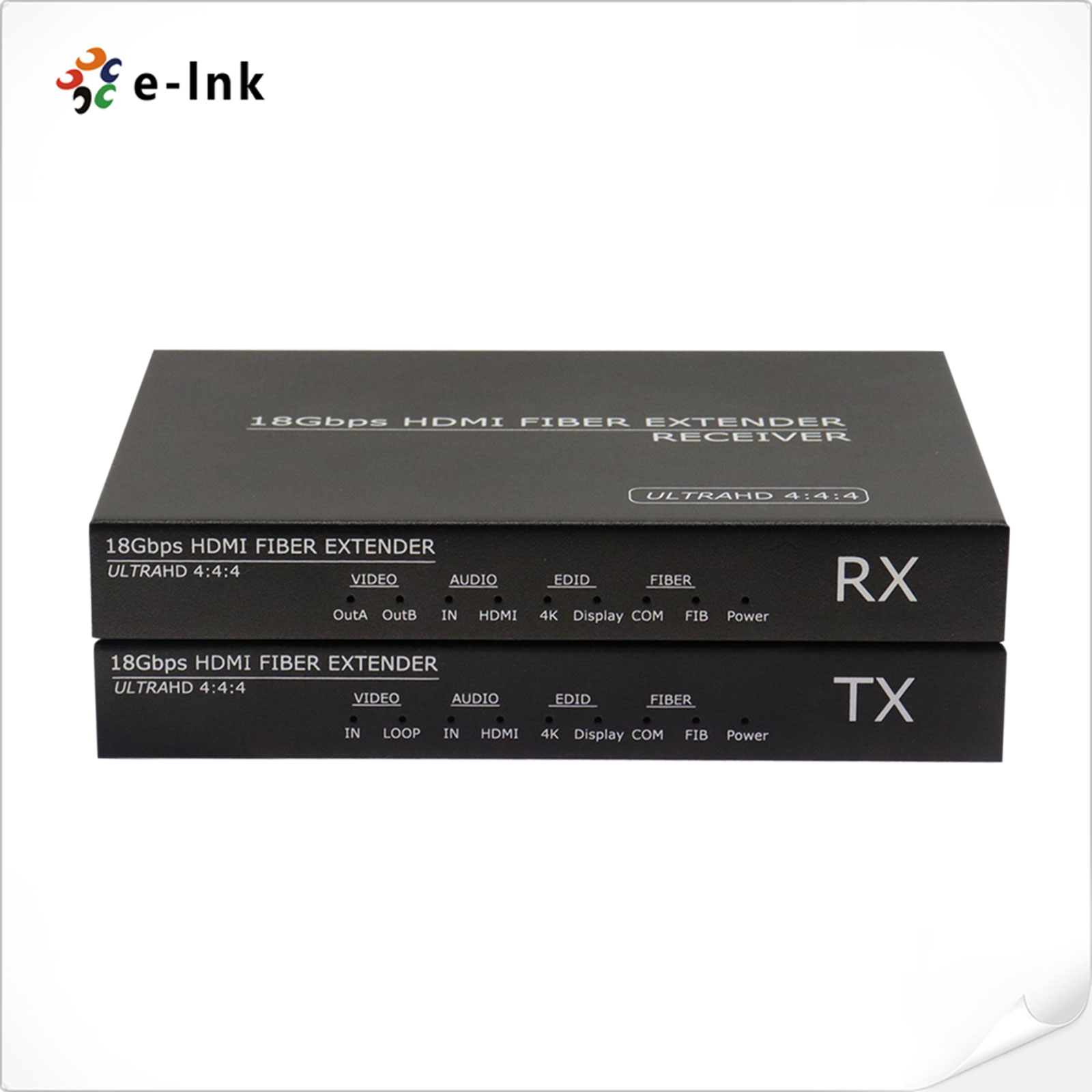
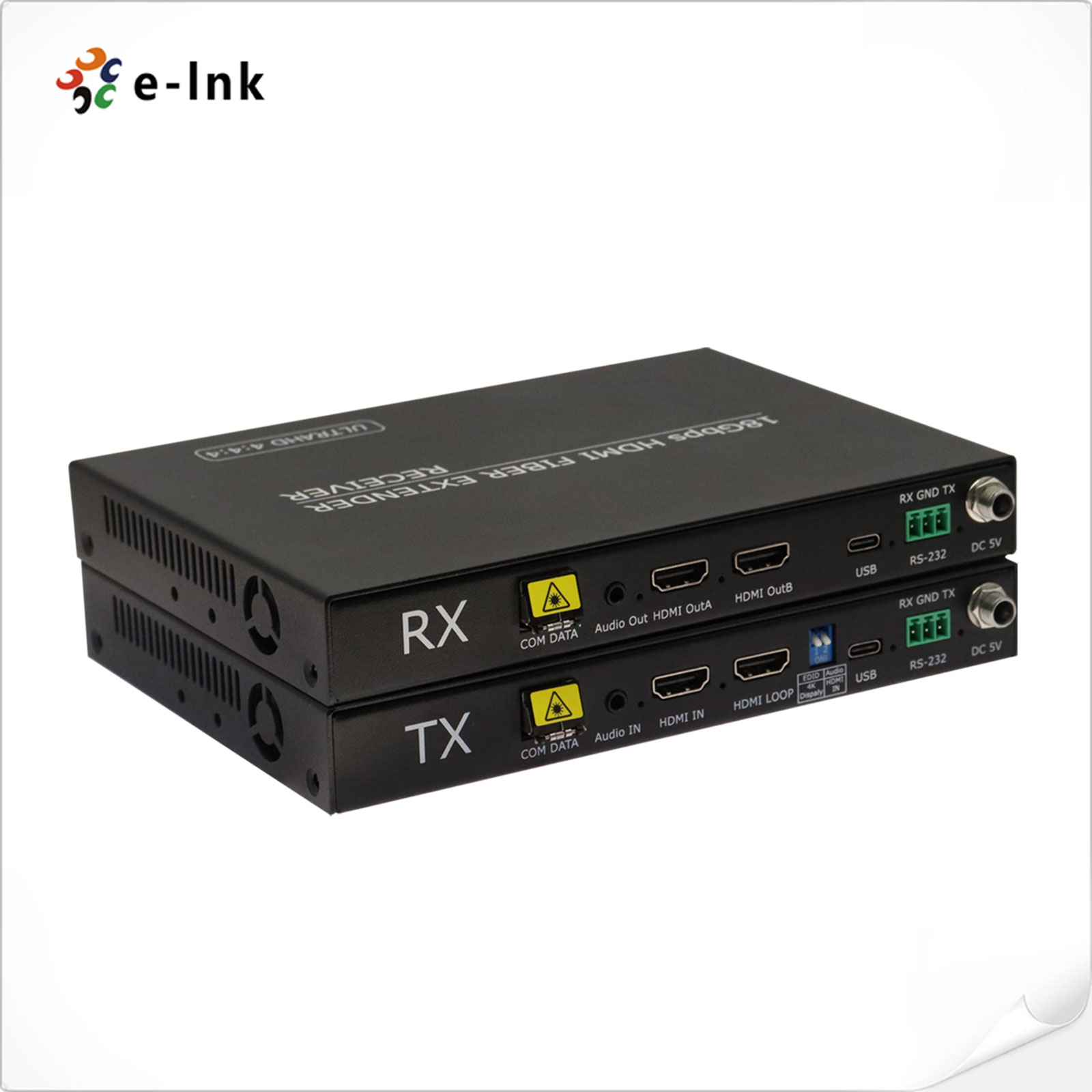
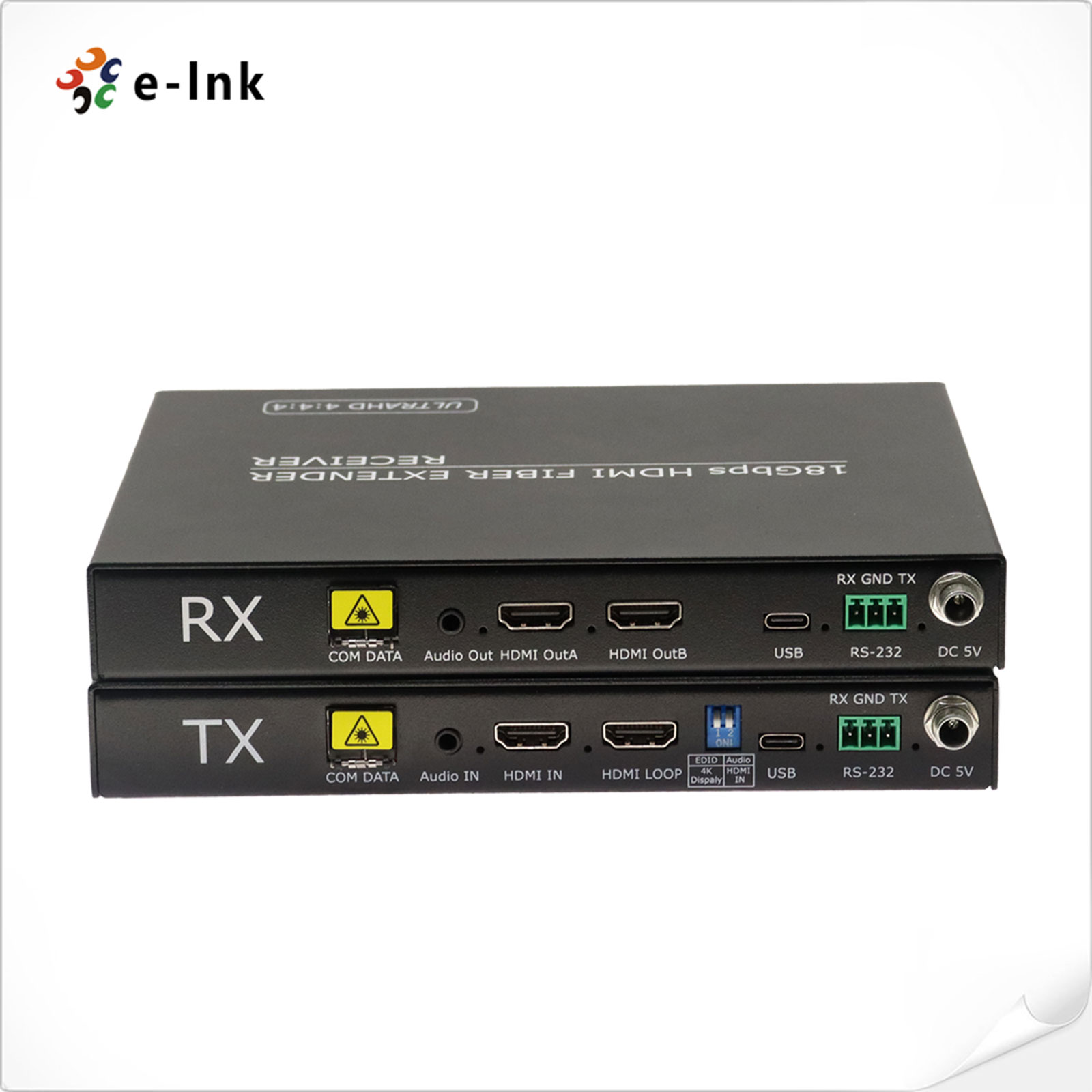
4K60Hz HDMI Video Fiber Extender
Model:LNK-4KH-UC-1A1R
► Support audio and video synchronization to extend the output
► Supports 18Gbps video bandwidth
► Support RS-232 transparent transmission and EDID management learning, simple and convenient control
► Support USB-C port connect PC to check device info, upgrade software and customize resolution





► Support audio and video synchronization to extend the output
► Supports 18Gbps video bandwidth
► The transmitter has a loop output interface (sharing a local signal) and external audio embedding
► The receiver has a backup output interface and an audio stripping output function
► Support RS-232 transparent transmission and EDID management learning, simple and convenient control
► Support USB-C port connect PC to check device info, upgrade software and customize resolution
► Transmission distances up to 80km (single-mode fiber)
► Video resolution up to 4K2K@50/60Hz; 7680*2160@30Hz 4:4:4
► Support custom non-standard resolution transmission, widest 7680, highest 7680
► HDMI audio formats: LPCM2/5.1/7.1CH, Dolby
Digital/Plus/EX, Dolby True HD, DTS,
DTS-EX, DTS-96/24, DTS High Res, DTS-HD Master
Audio, DSD
► Compliant with HDMI 2.0b, HDCP 2.2 and DVI 1.0 specifications
► Strong compatibility and widely used in display equipment such as LED/LCD/projection
|
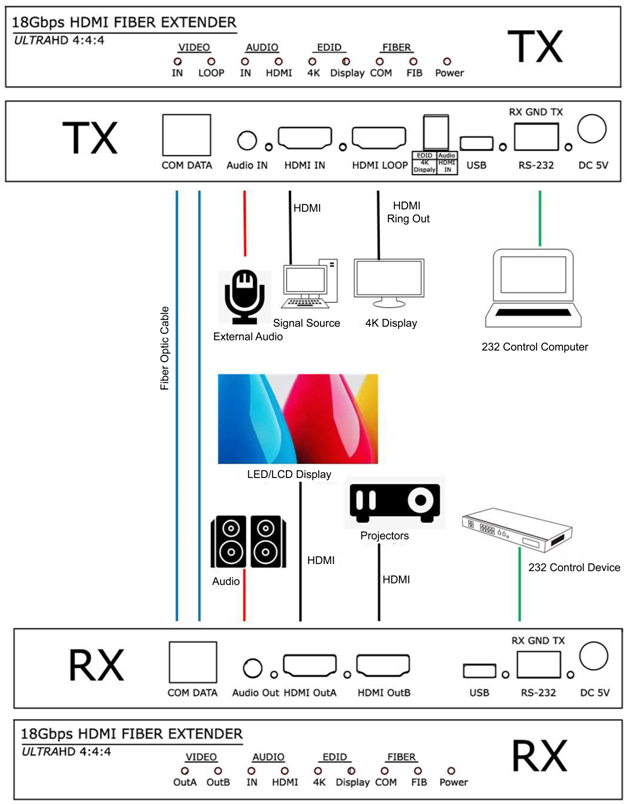
Transmitter Interfaces |
||
|
Standards |
1 x HDMI 2.0 Input (4K@60Hz) |
|
|
1 x HDMI 2.0 Loop-out (4K@60Hz) |
||
|
1 x Audio Input |
||
|
2 x LC Fiber |
||
|
1 x RS232 |
||
|
Receiver Interfaces |
||
|
Standards
|
2 x HDMI 2.0 Output (4K@60Hz) |
|
|
1 x Audio Output |
||
|
2 x LC Fiber |
||
|
1 x RS232 |
||
|
Video Resolution |
||
|
HDMI
|
SMPTE:720P/1080P/2160P |
|
|
VESA: 800x600/1024x768/1280x720/1280x800/1280x960/1280x1024/1400x1050/1600x1200/1920x1080/1920x1200/2048x1152/2560x1600/3840x1080/3840x2160/4096x2160/7680x2160/7680x1080/3840*2400/7680*1200/2160*4096 |
||
|
Supports custom non-standard resolutions |
||
|
Refresh Rate |
23.98/24/25/29.97/30/50/59.94/60Hz |
|
|
Supported Standards |
||
|
HDMI |
1.3, 1.4, 2.0 |
|
|
DVI |
1.0 |
|
|
Input Voltage |
DC 5V |
|
|
Maximum Power Consumption |
10W |
|
|
Operating Temperature |
-25°C to 55°C (Typical at 25°C) |
|
|
Humidity |
20%~90% |
|
|
Weight |
1.0kg (Device Weight) |
|
|
|
||
|
Dimensions |
315mmx290mmx20mm (Device Dimensions) |
|
|
330mmx295mmx25mm(Shipping Dimensions) |
||
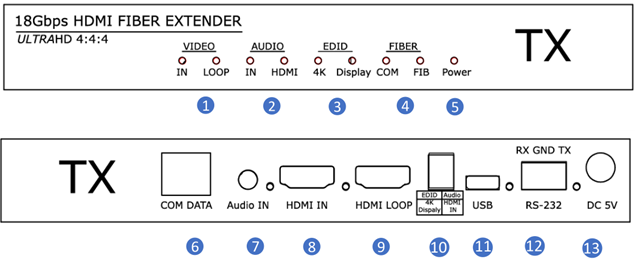
Transmitter
|
Number |
Name |
Function description |
|
1 |
Video signal indicator light |
IN: HDMI signal input indicator light. The indicator light remains on when there is a signal input from the HDMI IN input port, . The HDMI loop output indicator light stays on when a signal is transmitted from the HDMI loop output port to the HDMI display device. |
|
2 |
Audio indicator light |
When the Audio dip switch is turned towards IN, the indicator light stays on and the audio is an external audio input. When the Audio dip switch is facing HDMI, the indicator light remains on and the audio is an internal audio input of HDMI. |
|
3 |
EDID indicator light |
When the dip switch points upwards to 4K, the internal EDID of the device is used. When the dip switch points downwards to Display, the device automatically learns the EDID information on the display end. |
|
4 |
Fiber optic indicator light |
Fiber optic connection indicator light, when the transmitter and receiver establish a normal fiber optic signal connection, the FIB indicator light remains on. COM communication indicator light, when the transmitter and receiver establish a normal fiber optic signal connection, the COM light remains on and flashes when learning EDID. |
|
5 |
Power indicator light |
When the device is powered on, the power indicator light stays on. |
|
6 |
Fiber optic interface |
Single mode dual core LC; Connect the fiber optic module of the transmitter and transmit signals to the receiving end through fiber optic cables. COM is the communication port, DATA is the video transmission port. |
|
7 |
Audio |
Audio signal input port, connected to audio source devices such as MP3, etc. |
|
8 |
HDMI IN |
HDMI signal input port, connected to HDMI signal source devices such as PC. |
|
9 |
HDMI Loop |
LOOP HDMI video loop output port, connected to HDMI display devices to share local high-definition audio and video signals, such as HDTV, projectors, etc. |
|
10 |
Dip switch |
EDID dip switch, used for switching management between learning EDID and using internal EDID. Audio dip switch, used for managing and switching between HDMI internal audio and external audio. |
|
11 |
USB |
Used for connecting to the upper computer and upgrading equipment. |
|
12 |
RS232 |
RS-232 signal transmission interface, transmitting RS-232 command signals between transmitter and receiver. |
|
13 |
DC |
5V DC 5V/2A power interface. |
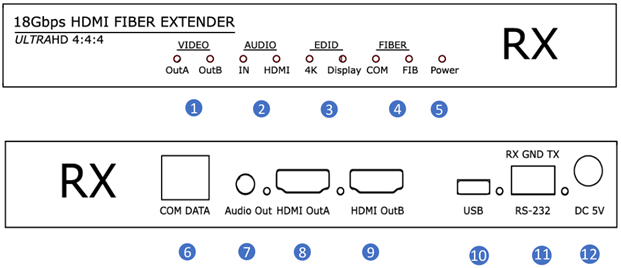
Receiver
|
Number |
Name |
Function description |
|
|
1 |
Video signal indicator light |
HDMI OUT: The indicator light remains on when HDMI is connected to a monitor or other display device. HDMI OUT: The indicator light stays on When HDMI is connected to a monitor or other display device. |
|
|
2 |
Audio indicator light |
When the Audio dip switch is turned towards IN, the indicator light stays on and the audio is an external audio input. When the Audio dip switch is facing HDMI, the indicator light remains on and the audio is an internal audio input of HDMI. |
|
|
3 |
EDID indicator light |
When the 4K indicator light is constantly on, the internal EDID of the device is used. When the Display indicator light is constantly on, the device uses the learning display terminal's EDID information. |
|
|
4 |
Fiber optic indicator light |
Fiber optic connection indicator light, when the transmitter and receiver establish a normal fiber optic signal connection, the FIB indicator light remains on. COM communication indicator light, when the transmitter and receiver establish a normal fiber optic signal connection, the COM light remains on and flashes when learning EDID. |
|
|
5 |
Power indicator light |
When the device is powered on, the power indicator light stays on. |
|
|
|
Fiber optic interface |
Single mode dual core LC; Connect the fiber optic module of the transmitter and transmit signals to the receiving end through fiber optic cables. COM is the communication port, DATA is the video transmission port. |
|
|
7 |
Audio out |
Audio signal output port, connected to speakers or mixing consoles, etc. |
|
|
8 |
HDMI OUT |
HDMI signal output port, connected to HDMI display devices such as monitors, projectors,4K transmission cards, etc. |
|
|
9 |
HDMI OUT |
HDMI signal output port, connected to HDMI display devices such as monitors, projectors, 4K transmission cards, etc. |
|
|
10 |
USB |
Used for connecting to the upper computer and upgrading equipment. |
|
|
11 |
RS232 |
RS-232 signal transmission interface, transmitting RS-232 command signals between transmitter and receiver. |
|
|
12 |
DC 5V |
DC 5V/2A power interface. |
- Download FileName:E-link LNK-4KH-UC-1A1R 4K HDMI Video Fiber Extender Datasheet V1.1.pdf Size: 1.65MB
|
Model |
Description |
|
LNK-4KH-UC-1A1R |
4K 60Hz HDMI Fiber Extender, with Audio, RS232, EDID function, Single Mode Dual Fiber, LC, 10/20/40/60/80KM optional. |
Recommended Products